AstonDB v5 Contact us
v5A home for the apps your people build with AI

Small apps power the company. Writing them is now cheap. Trusting them is not.

Most of a company's small apps are still spreadsheets and e-mail, because a proper app used to cost too much. An AI agent now writes one in an afternoon; IT cannot run code nobody vouches for. AstonDB makes such an app safe to run without trusting its author: login, roles, data access and deployment are enforced by the platform, whoever wrote the code, and every link beyond the app's own data is a permit IT gives by name. And every app can work with your people's AI assistants, under their own login.

Runs next to your PostgreSQL Your company login, your roles One file says what an app may do Nothing leaves the box without a permit Works with your people's AI assistants
intranet.acme.example/order-to-cash/
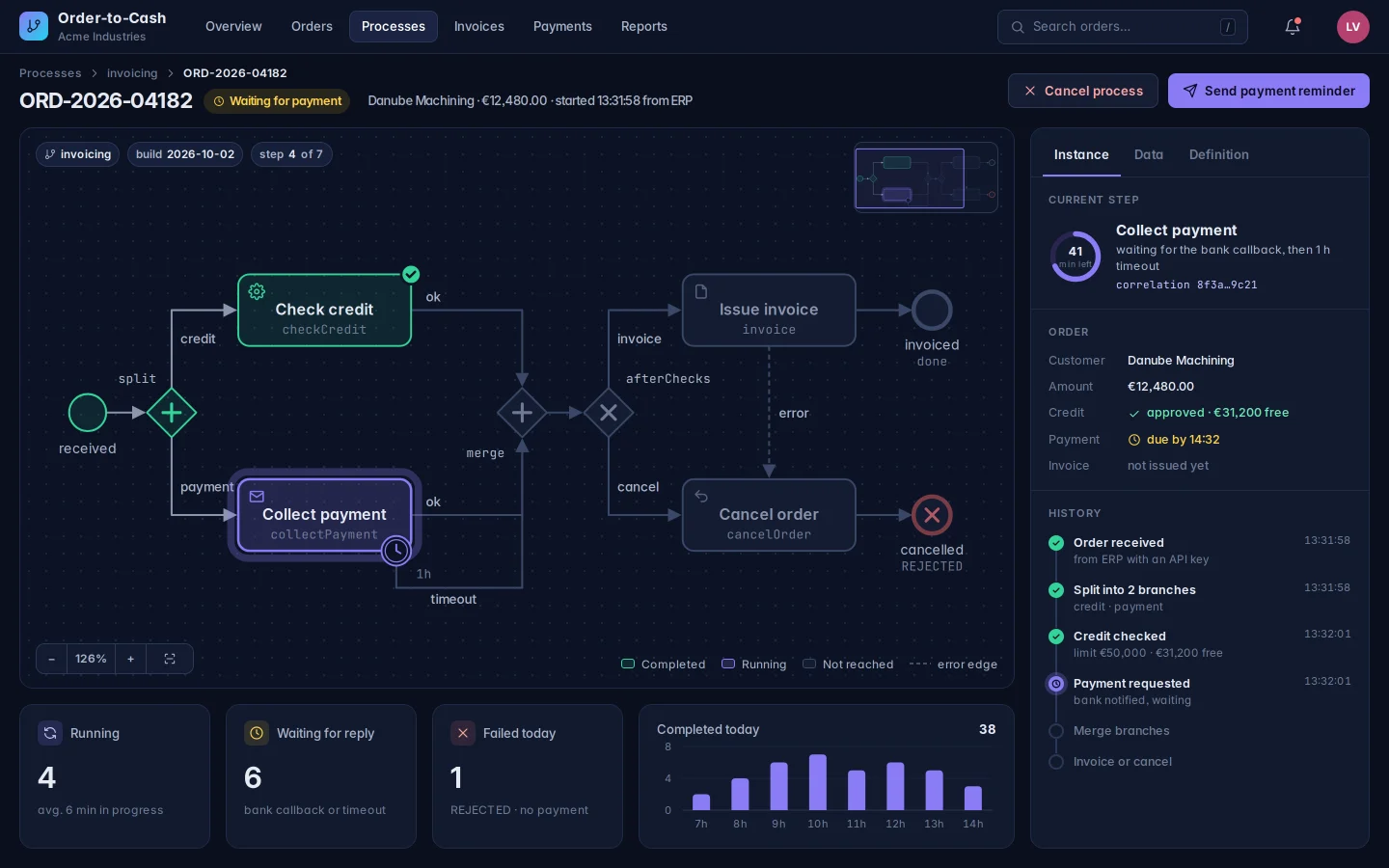
Order-to-Cash app showing a running invoicing process as a BPMN-style diagram
intranet.acme.example/sales/
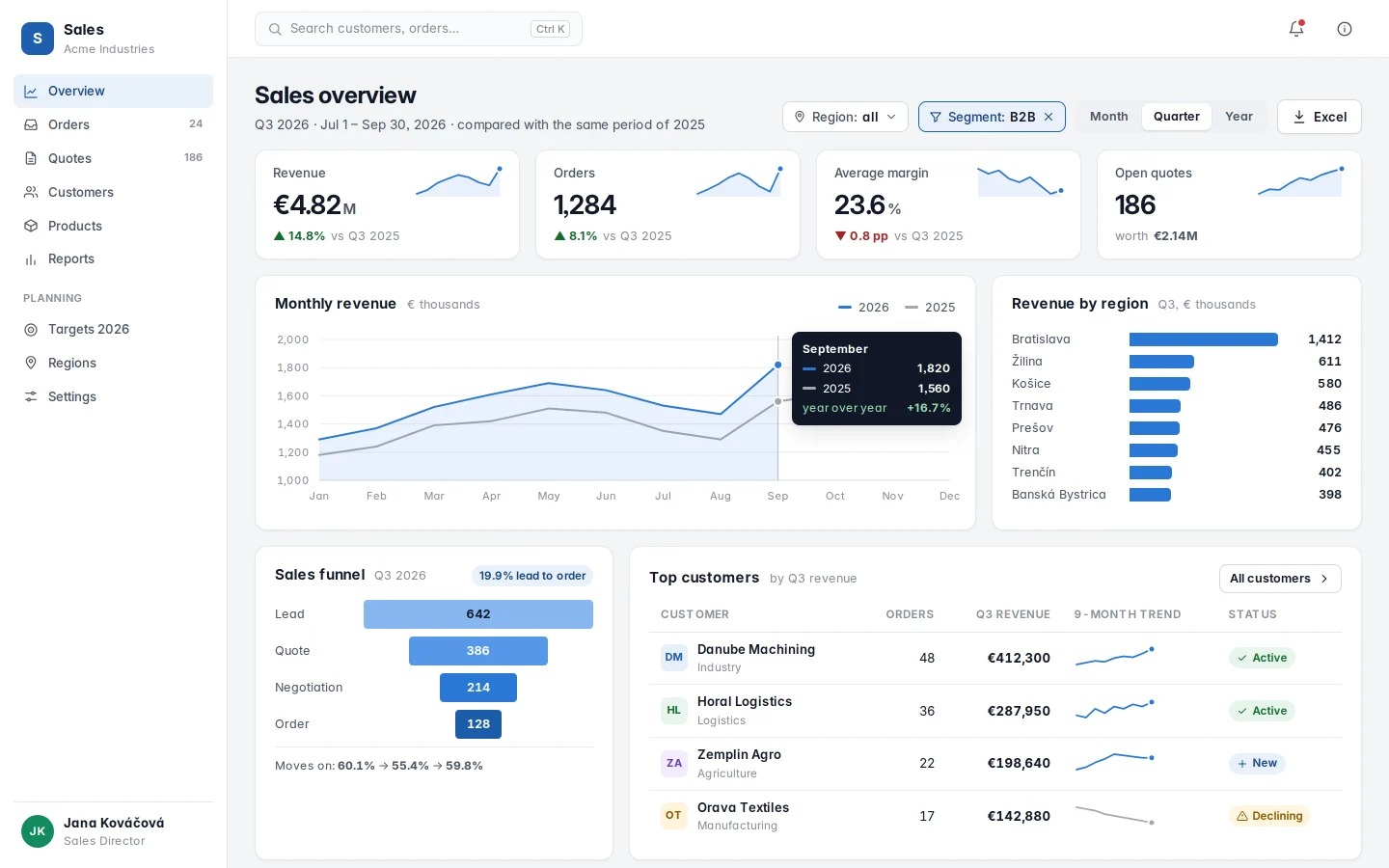
Sales overview dashboard with revenue charts, a sales funnel and top customers
Two sides, one contract

Both sides are right.

Your people can build apps with AI now, and IT can say yes. The business wants the app this month. IT wants to know what it reaches, who maintains it and what happens when it breaks. AstonDB answers both with the same file: a contract that says what the app may do, enforced by the platform. Read your side, then send the other one along.

If you run IT

You are asked to deploy an app nobody reviewed.

“An agent wrote it. I can't review all that code.”
You don't have to. One file says what the app holds and what it asks to reach beyond itself. Nothing outside its box opens until you permit it by name, and the rest of the code cannot widen it.
“Security holes.”
Login, roles, row access, SQL parameters, permits and secrets belong to the platform, not the app. A mistake in the app cannot switch them off.
“One more thing to run, one more thing to break.”
One container next to your PostgreSQL, with the company login you already run. A bad deploy is rejected and the old version keeps running; a runaway app stops only itself.
“AI assistants poking at company data.”
An assistant signs in as the person and gets the person's roles, nothing more. Writes are marked and can ask for confirmation. Only what the author published is reachable.
If you build things for your team

You could build it in a weekend. You can't get it deployed.

“IT says no to anything they didn't build.”
Give them one file to read instead of ten thousand lines. It says what your app holds and what it needs from outside. They permit each item by name, without another deploy, and the platform guarantees that is all it does.
“I don't do logins, roles, backups, servers.”
You don't have to. Company login is there, roles are a line in the contract, data sits in the company database, passwords stay in the platform's store, deployment is one command. If something is wrong, the old version keeps running.
“I'll be the one it calls at night.”
A bug stops your app, not the company. Every build is kept, so rolling back is a click in the admin, not a call to you.
“I want my team's AI to use it too.”
Add one line to an operation and it becomes a tool for your colleagues' assistants. Each of them sees only what they could see in the browser.

The same file, read from both sides. Nobody has to trust the code, only the contract.

Why AstonDB

Safe to run, whoever wrote it.

Leave requests, service visits, approvals, stock lists: this is where a company's day actually happens, and where AI changes the most. An agent can write the app in an afternoon, and an assistant can do much of the daily work in it. AstonDB is built for that world: the safety boundary sits outside the app's code, so an app is safe to run even when nobody has reviewed every line, and every employee's assistant works in the apps as that employee.

A contract you can read

Each app has one TypeScript file that says which data it has, who may read and change it, which jobs run and when, and what it asks to reach beyond itself: outside hosts, other apps, secrets.

Enforced at the door

The gateway checks every request against the contract before any app code runs, and opens nothing beyond the app that the admin has not permitted. Each app's SQL runs under its own database role that cannot see other apps or the platform's tables.

Many apps, one platform

Apps share one gateway, each at its own address, and deploying one restarts only that one. Apps can call each other and react to each other's changes, every link permitted by the admin.

Ready for every employee's AI

Each app can publish its data and processes as tools for AI assistants. Employees connect Claude, Copilot or another MCP assistant once and automate their daily work, with their own login and roles.

Demos

Five apps, five looks, one platform underneath

Every app brings its own frontend, built with any tool. What they share is the contract, the gateway and the guarantees that come with it.

intranet.acme.example/sales/
Sales overview: revenue tiles, monthly revenue line chart, revenue by region, sales funnel and a table of top customers
Dashboard · charts · Excel export

Sales overview

A quarter at a glance for the sales director, with a one-click export for the board.

  • Aggregations in plain SQL. env.DB runs tagged-template SQL under the app's own role, so joins and group-bys work on anything in the app's schema.
  • Big exports, no job time limit. The job only says what to export. The gateway streams the rows from PostgreSQL into the Excel file, one sheet per query.
  • Filters the client can't stretch. A list operation names the columns a client may filter by; the row perimeter stays on the server.
intranet.acme.example/order-to-cash/
Order-to-Cash: BPMN-style diagram of an invoicing process waiting for payment, with instance details and history
Long-running process · BPMN-style

Order-to-Cash

Every order from the ERP runs through a process that checks credit, waits for the payment and then invoices or cancels.

  • The graph is in the contract. Parallel branches, a join, a decision with declared candidates and both endings. The screen draws it from the same contract the platform runs.
  • Waiting costs nothing. The payment step sleeps as a row in the database until the bank calls back, or the one-hour timer sends it down the timeout edge.
  • Machines call in with a key. The ERP starts the process through a web job with an API key, no user session. Flow state survives restarts.
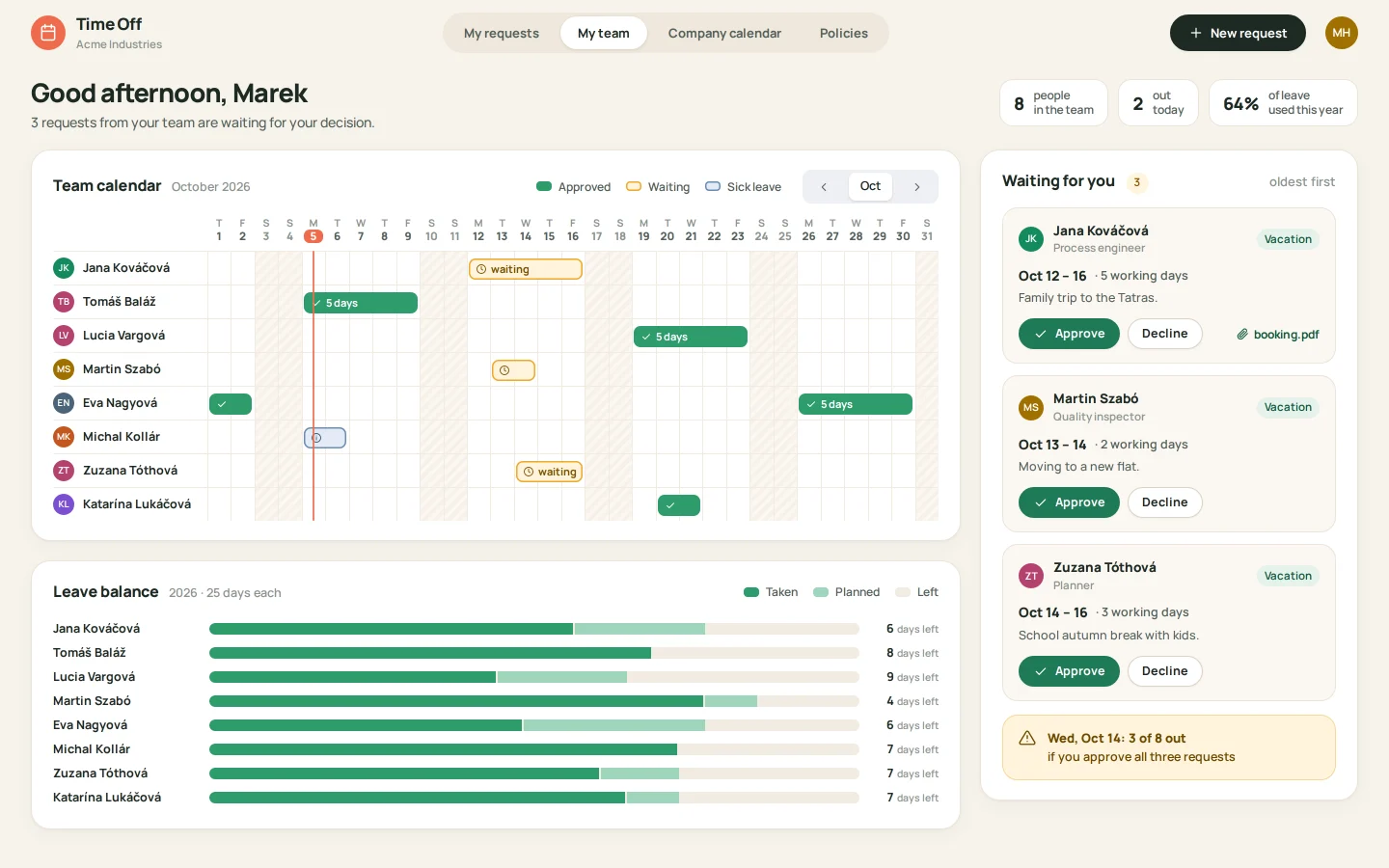
timeoff.acme.example/
Time Off: team calendar for October, leave balance per person and three requests waiting for approval
Approvals · row-level access · attachments

Time Off

Employees ask for leave, managers decide, and everybody sees the team calendar.

  • Your rows only. The operation compares the author with the e-mail of the session. The client never sees that condition and cannot remove it.
  • Only managers approve. The approval job is open to the manager sub-role; inside, it checks that the request belongs to the manager's team.
  • Attachments included. Files live in a bucket that app users can read; uploads go through a link signed by a job.
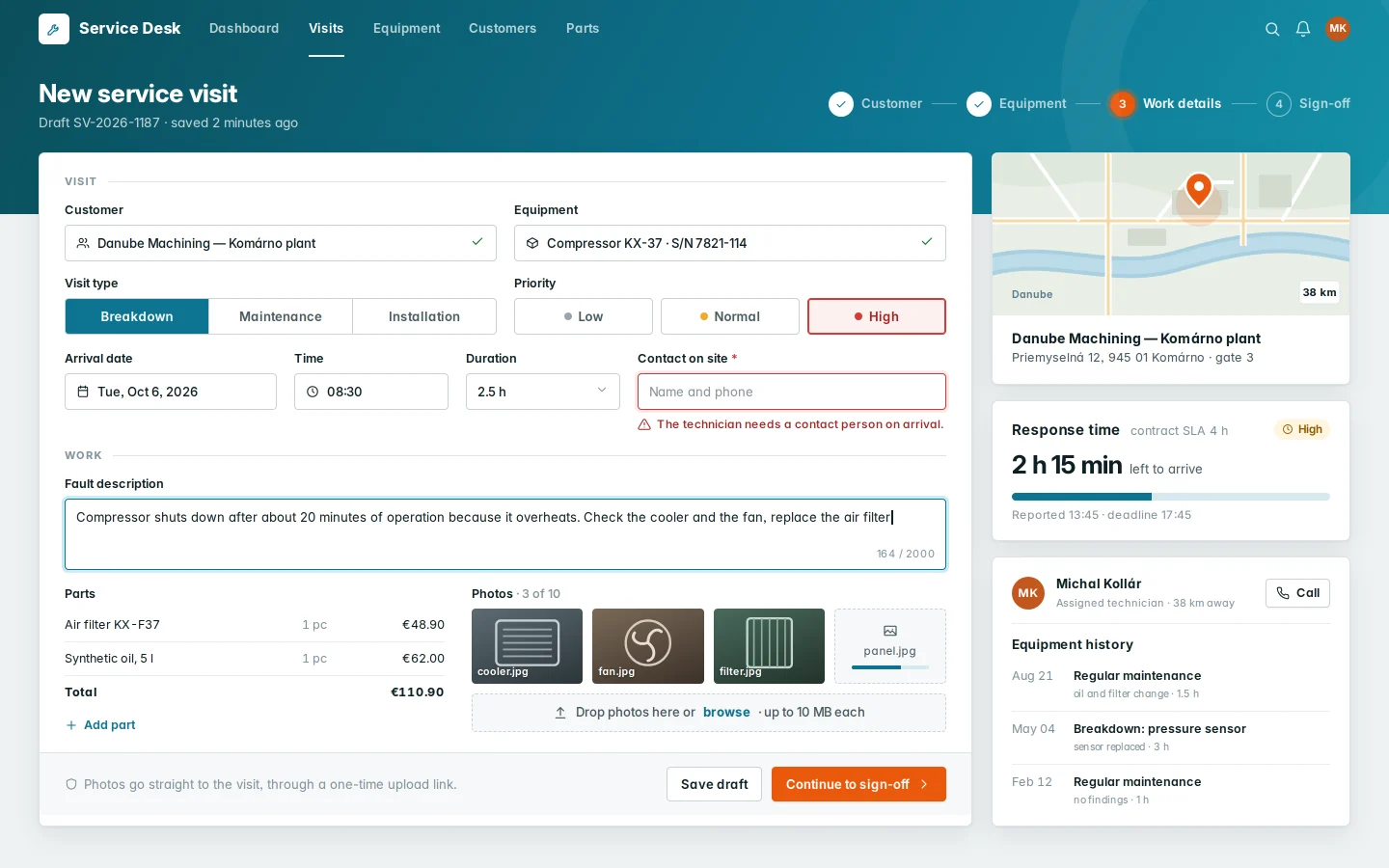
service.acme.example/
Service Desk: new service visit form with validation, parts, photo upload, map and response-time countdown
Forms · validation · photo upload

Service Desk

Dispatchers book a service visit, technicians get everything they need on site.

  • Validated where it counts. The form follows types from the contract, and the gateway checks the same input before anything is written.
  • Server-side rules. Values like the author come from the session, and conditions such as "end after start" run in the gateway, not in the browser.
  • Photos through a one-time link. A job signs an upload link with its own size and count limits. Without such a link, the browser cannot write to the bucket.
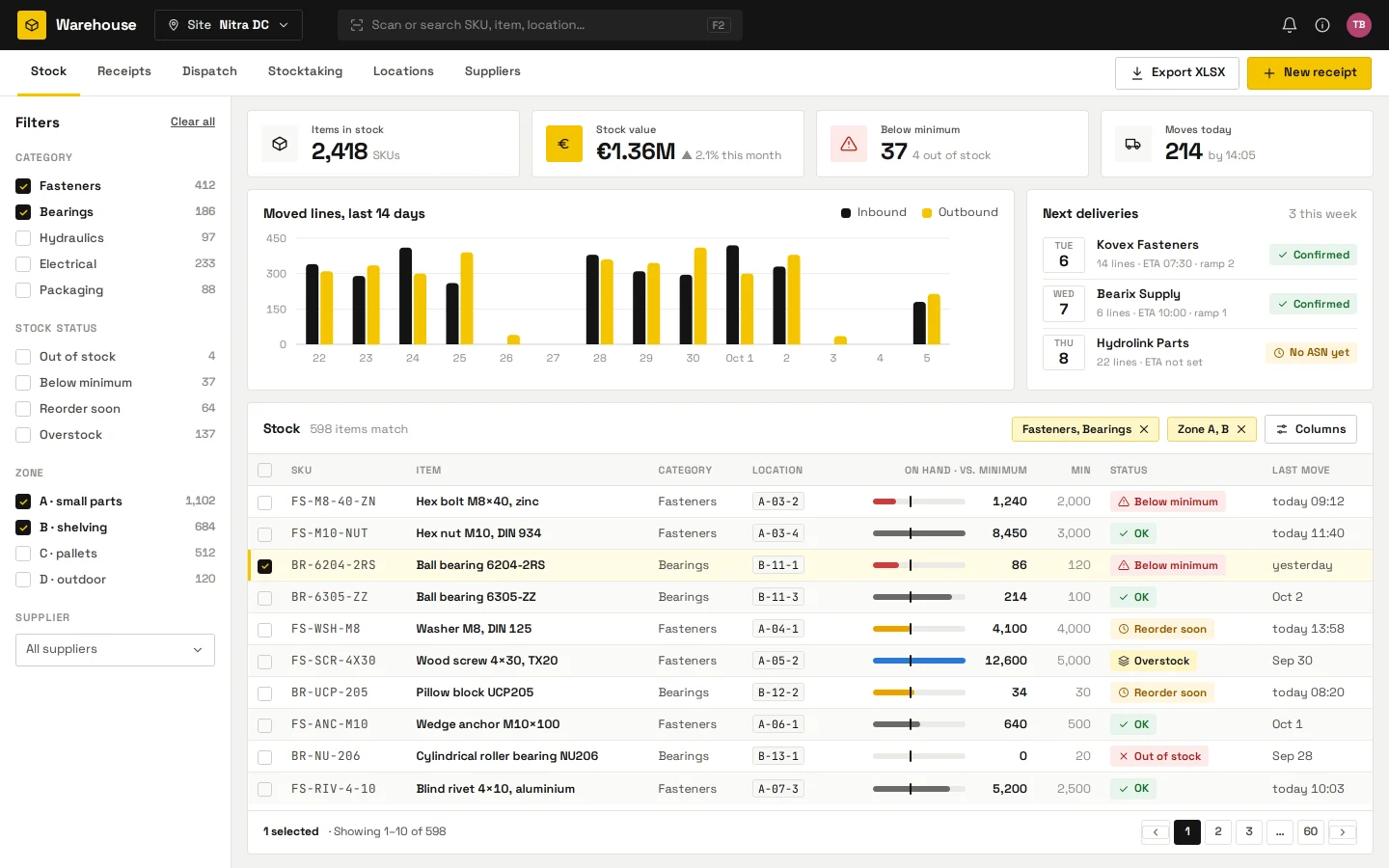
intranet.acme.example/warehouse/
Warehouse: stock table with filters, stock levels against minimum, movement chart and upcoming deliveries
Dense data · scheduled jobs · integrations

Warehouse

Stock levels, movements and incoming deliveries for the warehouse crew.

  • CRUD without server code. Lists, filters and paging come from contract operations that the gateway runs directly against PostgreSQL.
  • Jobs on a schedule. A cron job checks minimum stock every morning and emits events that other jobs react to.
  • Integrations on a leash. Supplier APIs are reached with plain fetch, but only at the host:port pairs the admin has permitted. OAuth tokens come from the platform's secure store.

The screens are design samples with made-up data. AstonDB does not prescribe a UI framework: each app ships its own static frontend.

AI for every employee

Publish your company's data and processes to AI. Give every employee the tools to automate their day.

Each app can offer what it knows and what it does as tools for AI assistants, over MCP, the open protocol that Claude, GitHub Copilot, VS Code and other assistants speak. Employees connect their assistant once, with their usual company login. From then on they ask, and the assistant works in every app they have access to, and in nothing else.

1

Publish

The app's author adds one line to an operation or a job in the contract: what it returns and when to use it. That line is the tool's manual for the model. Whatever has no such line stays out of AI's reach.

2

Connect

An employee adds one company address to their assistant and signs in with their usual company account. No keys to copy, nothing to install per app.

3

Ask and automate

The assistant picks the right tools across all the person's apps, looks things up first and narrows large lists before it reads them. Changes go through a separate tool, so the assistant can ask before it writes.

4

Grow without reconnecting

A new app, a new tool or a new role shows up on the next question. When access is taken away, it ends at once.

contract: one line makes a tool
teamRequests: op.list(teamRequest, {
  owner: s.role('manager'),
  where: { manager: s.eq(s.session.email) },
  mcp: 'Leave requests of my team',   // published to AI
  // fields, sort, limit …
}),
Daily work people hand over
  • “What is waiting for my approval?”
  • “Which items are below minimum stock, and what is on its way?”
  • “Book a service visit for this customer from the e-mail I just got.”
  • “Has order 4711 been paid?”
  • “Compare revenue by region with the last quarter.”
  • “Book me Friday off.”

Answers from your own data

It looks things up in your apps instead of guessing. A misspelled name or a missing accent is fine: ask for “Novak” and it finds Novák. In a long list it gets counts and an overview first, then reads only the rows it needs.

Gets work done, with your OK

Ask it to file a request, approve one or update a record. Looking things up happens right away. Anything that changes data is marked as a change, so your assistant can ask you to confirm it first, and it is recorded under your name, as if you had clicked it yourself.

Sees exactly what you see

Same login and same roles as in the browser. If you can't open an app, neither can your assistant. When IT adds an app or gives you a new role, the assistant knows on your next question; when access is taken away, it ends at once.

How an app author publishes tools, and what the assistant gets back, is in the contract guide.

Permits & secrets

The app asks. The admin decides, by name.

An app may do anything with its own data and nothing beyond it. An outside host, another app, the names of your people, a password: each is a line the contract asks for and a decision IT makes in the admin, one name at a time. Changing it needs no redeploy, and taking it back works on the next call.

Integrations you can list

Every outside host, every other app and every event an app may receive is a permit with a name. The admin sees them all, and for each app who can reach it.

Apps that work together

One app calls a job of another or reacts to its changes. By default it goes as the signed-in person, with that person's roles; as the app only where the other app's author allows it.

Act as the person, elsewhere

With a permit, a job works in another system in the person's name, with the token their company login issued, and only while they are signed in.

Secrets the code never holds

The contract names what it needs; the admin sets each value or points it to a shared one. OAuth clients and incoming API keys never reach the code.

AstonDBApps/reports

Permits

6 of 7 permitted · 1 denied
KindNameState
egressapi.acme.example:443permitdeny—
egresscrm.acme.example:443 ← CRM_URLpermitdeny—
egressstats.example.net:443permitdeny—
apierp/orderStatuspermitdeny—
apiwiki/importPages as apppermitdeny—
api$view/myMemberspermitdeny—
eventleave:request.createpermitdeny—
See permits and secrets step by step →
Security by construction

Safety that does not depend on the app being written well

Every guarantee below is enforced by the gateway or by PostgreSQL. A mistake in the app's code, human or AI, cannot switch it off.

No public appsEvery app requires login and the role named after the app. Machine access is an explicit exception: one web job, one API key.
Row perimeter on the serverOperations carry their own where, set and check. The gateway applies them; the client cannot see or bypass them.
One schema, one role per appAll app SQL runs under the app's database role. It sees its own schema and nothing of the platform; even the names of people come only through a read-only view the admin permits.
No SQL injection by accidentSQL is written only as tagged templates, so every value is a parameter. Contract expressions are a closed set, never an SQL string.
Nothing leaves the box without a permitOutside hosts, other apps, platform views and other apps' events open only by a permit the admin gives by name. Internal addresses never, at most 1,000 calls per run.
Secrets stay with the platformAn encrypted store holds passwords, OAuth clients and API keys. The contract only names them, the admin sets each value, and the code never sees an OAuth client secret or an incoming API key.
Sessions the browser can't leakThe session lives on the server and travels in a Secure; HttpOnly cookie. It survives a restart, an admin can end it everywhere at once, and writes need a CSRF header that foreign sites cannot send.
Every door is on recordEach permit and secret change is a log line and an event, and every app's detail shows which other apps can reach it.
Admin apps stay with adminsAn app that administers the platform is uploaded, opened and managed only by human admins, and no other app can call it or receive its events.
One bad app cannot take the rest downEach app runs in its own process, watched every two seconds. One that burns processor or memory is stopped, and one that keeps doing it is parked until it is deployed again. Its neighbours go on serving.
Strict frontendsEvery app page gets a strict CSP: own scripts only, no eval, no external APIs, no framing.
AI works as the person, never above themAn assistant signs in with the person's company account and gets their roles, checked again on every call. The gateway never accepts the assistant's own token, and administration is not reachable through it.
Only what the author publishedAn operation or job reaches AI only with an mcp line in the contract. Reads and writes are separate tools and the gateway enforces which is which. Files never go to the model.
From empty folder to production

A handful of commands, then the admin hands out roles

1

Create the app

Your admin sends you the app URL and a deploy key. One command turns them into a working skeleton with a contract, a job, a test, a page and a migration. It ships a CLAUDE.md, so Claude Code picks up the whole manual on its own.

2

Write the contract and the jobs

By hand or with an AI agent. Typecheck catches mismatches between the contract, the server and the frontend.

3

Test in the real runtime

Jobs run in the same runtime as in production, against an in-memory backend or a local database with the app's migrations.

4

Deploy while everything runs

The gateway checks the contract, tries the new worker, runs migrations in one transaction and compares the schema with the contract. Any finding rejects the build and the old version keeps running. When the platform itself moves to a newer version, one command brings the app's project along with it.

5

Grant access and permits

The admin gives people the app's role and sub-roles, sets its secrets and decides what it asked to reach. Their AI assistants see the app's published tools on the next question. Every build is kept with its contract hash, so you can see what runs and go back to an older build.

terminal
npm create @astondb/app
? App URL: https://timeoff.acme.example/
? Deploy key: ********
app leave created in ./leave

cd leave
npm install
npm test        # handlers run in the real runtime
npm run build   # contract.json, server.js, web, migrations
npm run deploy
contract/src/index.ts
export default contract({
  app: 'leave',
  roles: { manager: 'Approves leave requests of the team' },
  secrets: ['HR_OAUTH'],                          // names only; the admin sets values
  permits: { egress: ['hr.acme.example:443'] },   // asks; the admin permits
  records: { request, teamRequest },
  ops: {
    myRequests: op.list(request, {
      owner: s.access,
      fields: ['id', 'from_date', 'to_date', 'state', 'note'],
      where: { author: s.eq(s.session.email) },   // only my rows
      limit: 100,
      mcp: 'My leave requests, newest first',      // a tool for AI
    }),
  },
  jobs: { review, reminder },
  // buckets, flows …
})

Read the full walk-through in the contract guide and the handler API guide.

In your infrastructure

One server app, your PostgreSQL, your file storage

AstonDB runs in your infrastructure: one server app next to your PostgreSQL, with files on a disk, in S3 or in Azure Blob. Inside it, the gateway is the only door, and app code runs in workerd, the open-source runtime behind Cloudflare Workers, with no network or disk of its own. People sign in with the company login they already have. Apps are written in TypeScript, and a frontend is optional.

One server app PostgreSQL for data Disk, S3 or Azure Blob for files TypeScript apps Frontend optional, any tool
Questions

Frequently asked

Is this vibe coding?

Yes, for a company. Your people describe the app and an AI agent writes it, and nobody has to review that code line by line. The difference from vibe-coding tools for individuals: IT decides who gets each app's roles and permits every link beyond it by name, and the platform enforces that whatever the code does.

Do we have to use AI to build apps?

No. Apps are ordinary TypeScript and people write them too. AstonDB was designed so that code written by an AI agent is safe to run, and the package manuals are written so that an agent like Claude Code can follow them.

Can we use our AI assistant with the apps?

Yes, that is what it is built for. Anyone can connect an assistant that supports MCP to one company address and sign in with their usual account. The assistant can then look things up and make changes in the apps you have access to; changes are marked as such, so it can ask you to confirm them first. It never sees more than you do, and it never needs a password or key copied into it.

Which AI assistants work?

Any assistant that can connect to a remote MCP server with sign-in, for example Claude, GitHub Copilot, VS Code or opencode. The assistant registers itself, the person confirms the connection and signs in with the company account. A built-in check tells them the connection works even before any app has published a tool.

Who decides what the AI may touch?

The same people as for the browser. The app's author publishes an operation or a job to AI with one line in the contract; what is not published, no assistant can call. The admin decides who has which app and role. An assistant then uses exactly what its person may, and nothing of the administration.

Which frontend framework do we need?

None in particular, and an app does not need one. A frontend is a folder of static files built with any tool, which the gateway serves at the app's address. The demos on this page each have a different look.

Can apps talk to our ERP and other systems?

Yes, in both directions. Outbound, a job calls fetch to hosts the admin has permitted, with credentials and OAuth tokens from the platform's secure store. Inbound, another system calls a web job with an API key.

Who decides what an app may reach?

Your admin. The contract can only ask: for an outside host, a job of another app, a list of people, an event. Each request is a row in the app's detail that the admin permits or denies by name, and the decision applies at once, without a redeploy. A request without a permit never blocks a deploy; that one door simply stays shut.

Can apps work with each other?

Yes. An app can call a job or an operation of another app and react to changes in its tables, each with a permit. The call goes as the signed-in person, and the other app checks that person's roles as if they had clicked. A job whose author allows it can also be called on behalf of the app, for example from a nightly schedule. When the work takes minutes or hours, the call need not be waited for: the asking app finishes, and the answer arrives later in a job of its own. The admin sees for every app which other apps can reach it.

Can an app act for the person in our other systems?

Yes, when your company login is set up for it and the admin permits it for that app. The job gets the person's own access token from the company login and calls the other system in their name, with exactly the rights that person has there. The token lives only as long as their login, in the browser or through their AI assistant.

Can we automate administration?

Yes, with an admin app: an app that hands out roles, sets permits and secrets and reacts to every change in the platform, from its own screens or on a schedule. Only admins can upload and open it, and it reaches other apps and outside hosts only through permits a human admin gives it.

What happens when a deployment goes wrong?

The deployment is rejected with all findings and the previous version keeps running. Migrations run in one transaction, so a failed one leaves the schema as it was. Recent builds stay in the admin, ready to roll back to.

Does one app's bug affect the others?

Each app has its own process, schema and database role. A job that runs too long stops its own app's process; the other apps keep working.

How is it licensed?

The packages app authors use (@astondb/contract, @astondb/executor, @astondb/deploy and @astondb/create-app) are on npm under the MIT license. Talk to us about running the platform.

Which spreadsheet hurts most?

Tell us the process that lives in Excel and e-mail today. We'll show you how it looks as an AstonDB app, running on your own infrastructure, and how your people's AI assistants work in it.

Peter Molnár Aston ITM s.r.o.
peter.molnar@aston.sk
Write to us